Business Card Design: Make Every Detail Worth Keeping
- Project
- Graphic Design
- Drawn by
- Peter Makeshoff
- Issued
- Sheet
- A-42
Useful details, distinctive materials and easy digital links can give a business card a reason to stay in someone’s wallet.

A business card has only a moment to earn a place in someone’s pocket. Contact details help a person find you again, but they rarely explain why they should. For designers, the challenge is to make the card work as a compact reminder of the value behind the name: something useful, easy to recall and simple to act on.

Give the card a job
A card that lists a name, title, phone number, email and website can do its basic job, yet those details are often the same information exchanged in conversation. Without another reason to keep the card, it becomes one more contact slip among many.
Start by deciding what you want the recipient to remember or do. The card might offer a practical reference, point to a useful resource, or capture a detail from the conversation. That purpose can guide what goes on the card and what should be left off. Contact information still matters, but it should support the card’s main idea rather than carry the whole design.
Think of the card as a small introduction to the experience of working with you. A concise service description, a relevant prompt or a link to a focused page can make the next step clearer. The aim is to give the recipient a reason to reconnect that makes sense to them.
Make the design recognizable
When a stack of cards shares the same format, pale stock and predictable placement of a logo and contact details, individual cards can blur together. Distinctive choices help a card stay recognizable after the event is over. A strong color, tactile paper, a considered shape or a spare but unusual layout can all help create that distinction.
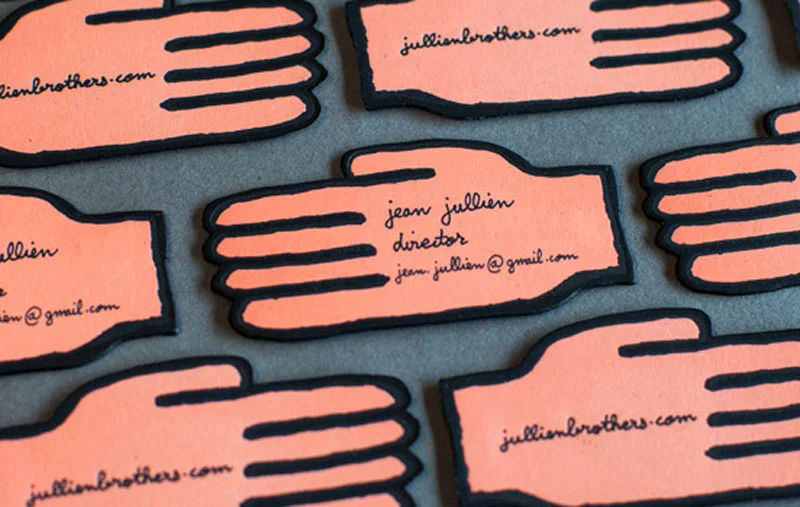
Distinctiveness doesn’t require decoration for its own sake. Each choice should fit the person or work represented by the card. A textured surface can invite someone to pick it up; a distinctive color can make it easier to spot later. A shape that departs from the familiar format may catch the eye, though it should still be comfortable to carry and store.
Before committing to a print run, look at the design alongside other cards. Check whether the name is easy to find, whether essential details remain legible, and whether the material or shape makes the card awkward to handle. A memorable detail should strengthen the card’s purpose, not get in its way.
Build in practical value
A useful card offers something the recipient can return to. Depending on the work, that might be a short tip list, a measurement guide, a conversion chart or a mini calendar. The content should be relevant enough to keep and concise enough to fit the format.
That constraint can improve the design. A small printed reference needs clear hierarchy: the useful information should read quickly, while the name and contact route remain easy to find. Choose one practical idea and give it room. Trying to squeeze in several unrelated features can turn a helpful object into a dense one.
Ask what a recipient might reach for the card to remember. A designer working with a particular kind of project could offer a short checklist; another service might call for a compact reference guide. Those are design directions, not a substitute for knowing the audience. The closer the printed material is to a real need, the more natural it feels to keep.
Connect the printed card to a next step
A physical card can point toward a digital experience without asking someone to type a long address from memory. A QR code, short URL or easy-to-search social handle can make that transition simpler. The destination should follow through on the reason the card was handed over: a relevant video, a focused landing page or another useful resource.
Make the route clear. A QR code can save typing, while a short URL offers a readable alternative. Either way, label what the recipient will find so the link doesn’t feel like an unexplained detour. Keep the destination specific to the card’s purpose, and make sure the printed address or code is easy to scan or read.
The card and its digital destination should feel like parts of one introduction. A crowded card with several competing links can make the next step less obvious. Choose one primary action and give it enough visual prominence to find quickly.
Make the exchange personal
Small personal details can distinguish a card handed over after a conversation from one passed along without context. A handwritten note, a specific offer or a brief reference to the topic you discussed can help the recipient connect the object to the person they met.
Personalization doesn’t have to mean producing a different printed design for every person. A space for a note can be enough. The card’s layout should leave room for that gesture, and the exchange should give the note a clear purpose. A relevant reminder is more likely to help someone recall the conversation than a generic line printed on every copy.
A quick review before printing
Judge the card from the recipient’s side. Would you keep it? Does it offer something useful, or does it only repeat details from the conversation? Can you recognize it among other cards? Is there a clear route to a relevant digital experience? Does anything about it recall the person who gave it to you?
If the card has no clear answer to those questions, return to its purpose before adjusting the decoration. Choose one reason to keep it, then make the format, materials, hierarchy and link support that reason. A business card can be both a contact tool and a small piece of useful design; the strongest versions make each element earn its space.
The post Why Your Business Card Ends Up in the Trash appeared first on Designer Daily: graphic and web design blog.
| Rev | Description | Date |
|---|---|---|
| A | Issued for reading | |
| B | Viewed 901 times | Current |