Vynetta’s Ugly Sweater Flyer Turns Fair Isle Knits Into Editable Vector Art
- Project
- Graphic Design
- Drawn by
- Dirk Petzold
- Issued
- Sheet
- A-15
Vynetta’s Illustrator flyer pairs pixel-knit motifs with practical event details. Change its Christmas Day placeholder, then tune color and type for print or screens.
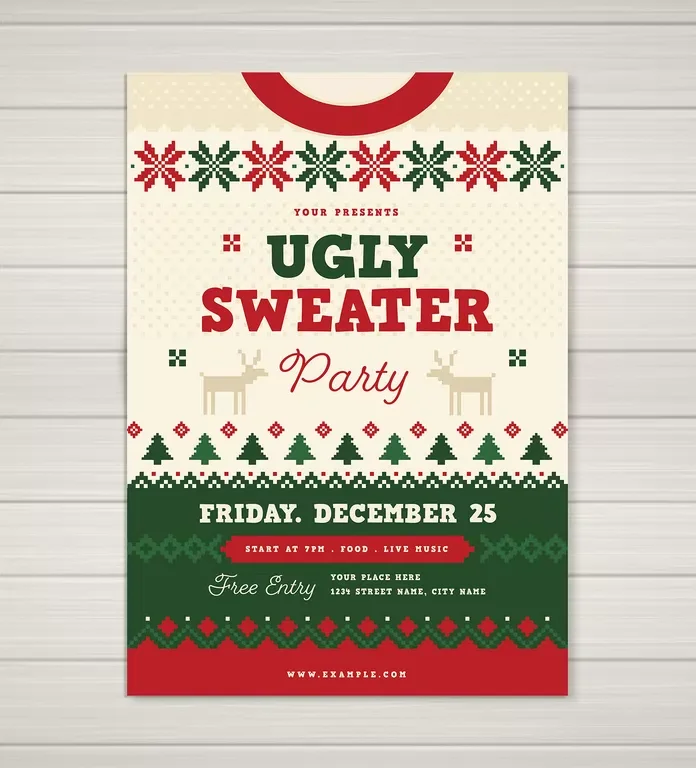
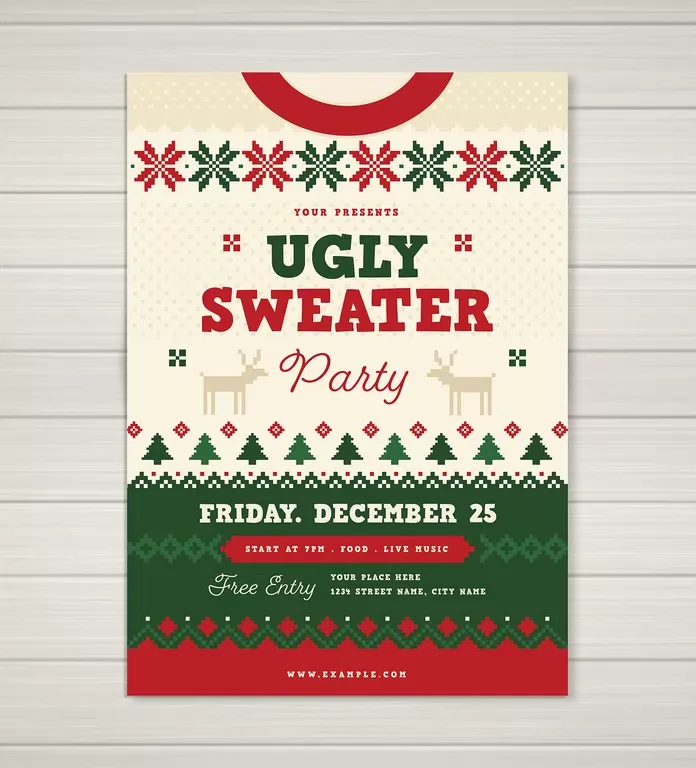
Vynetta’s ugly sweater party flyer gets its visual joke from geometry: snowflakes, reindeer and trees are built from crisp square pixels, like a knitted pattern. The design is polished enough to read at a glance, though that polish slightly undercuts the deliberate clash an ugly sweater usually promises. For hosts, the practical appeal is clear: the Illustrator template is editable, and its information is arranged in distinct horizontal bands.
There’s one detail to fix before any styling work. The date reads “Friday, December 25,” placing the event on Christmas Day. Replace it with a suitable date and check that the weekday matches. The host name, time, address and web link are also placeholders, so update those before sending invitations.
Find the template on Adobe Stock. It’s a vector layout made for Adobe Illustrator, which needs to be installed to edit the file. Adobe provides its current Illustrator version through Illustrator and Creative Cloud. The source does not state a price.
A flyer structured like a sweater
The layout runs in horizontal bands from collar to hem. At the top, a red collar shape frames a cream strip patterned with eight alternating red and green snowflakes. The central cream area holds the headline, with pixel-style reindeer on either side and a line of pine trees below. A green block groups the event details, including the date, a ribbon for the time, “Free Entry” and the address. A red band with a web address closes the composition.
That clear division gives each kind of information a place, while the stacked bands evoke the construction of a sweater. The square-pixel treatment is the visual thread connecting the sections: snowflakes, reindeer and trees share the look of motifs charted stitch by stitch for Fair Isle knitting. Because the artwork uses vector shapes rather than a sweater-texture photograph, it stays sharp when resized.
The file comes in US Letter and A4 sizes, with CMYK color set for print. Size, color, shapes and text can all be changed. That flexibility makes the layout useful for both printed invitations and adapted versions, provided the color mode is set for the intended output.
Type, palette and legibility
A heavy slab-style display face gives “UGLY” and “SWEATER” their weight; the words are set in green and red. A looping script supplies “Party” and “Free Entry.” The two styles establish a quick hierarchy between the main event and supporting details. Before editing, open Illustrator’s Type menu and choose Find Font to check the file’s typefaces. If a font is missing, Illustrator may substitute another one, changing the headline’s weight and the script’s character.
The original palette uses red, dark green, cream and sandy tan for the reindeer. Four colors keep the artwork cohesive and limit the number of inks in a typical print setup. For a more unruly sweater effect, recolor selected motifs in clashing shades. In Illustrator, select the artwork, then use Edit > Edit Colors > Recolor Artwork. A small change in color can shift the tone without disturbing the banded structure.
Edit the information before the decoration
Work through the practical details first. Start with the date and verify its weekday. Replace “Your Presents” with the host’s name so guests know who’s inviting them. Rewrite the time ribbon with a few short details, such as the start time, food and music. Add the venue address beside “Free Entry,” then replace the sample web address with an RSVP link or short URL. Once those facts are correct, adjust the palette and other styling.
The smaller logistics deserve particular attention on phones. The time ribbon and address line are less prominent than the date, and their type may become difficult to read at screen size. Increase both to around the date line’s size, then check the full design at the scale guests will see it. “Free Entry” uses cream script against dark green; while that pairing can work on paper, the thin letterforms may lose clarity when displayed small.
For social posts, change the document from CMYK to RGB through File > Document Color Mode > RGB Color. Then inspect the greens and other colors again. The screen version can look brighter than the print file, so a quick review helps keep the design’s contrast and hierarchy intact across formats.
Format and use
Adobe Stock lists the design under contributor Vynetta. The template’s two print sizes, editable vector artwork and grouped event details suit office gatherings, bar nights and family events. Before using it, check Adobe Stock’s license terms, especially if the event is public or commercial.
The design’s most useful idea is its pixel-knit motif system: it makes the sweater reference legible without relying on a photographic texture, and the vector shapes hold up at different sizes. Its main weakness is the controlled palette and tidy composition. Push the colors into deliberate clashes, keep the event details easy to scan, and the flyer can carry the joke while still doing its job.
| Rev | Description | Date |
|---|---|---|
| A | Issued for reading | |
| B | Viewed 344 times | Current |