Designing a 404 Page That Helps Visitors Find Their Way
- Project
- UX & UI Design
- Drawn by
- Peter Makeshoff
- Issued
- Sheet
- A-38
A useful 404 page pairs clear language and brand-aware design with search and links that help visitors recover from a broken path.
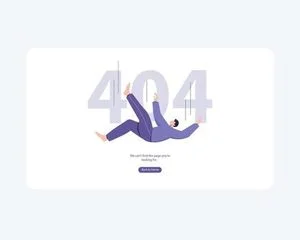
A 404 page is a small but revealing part of a website. Someone has followed a broken link, entered an outdated address or landed on a page that has moved. They came looking for something specific; now the interface needs to help them recover. A well-designed response can preserve trust by making the problem clear and offering a next step.
That makes the 404 page more than a place to display an error code. Its language, navigation and visual tone all shape what happens after the expected content fails to load. The strongest pages handle those jobs together: they acknowledge the dead end, give visitors a way to continue and still feel like part of the site.
Explain the problem in plain language
“404 Not Found” identifies a technical condition, but leaves visitors to work out what it means and what to do next. A short, human message—“We couldn’t find that page”—makes the situation easier to understand. A second line can offer a likely explanation, such as a link that may be broken or a page that may have moved.
The wording should stay calm and direct. Visitors arriving at an error page may already be confused or frustrated, so the copy needs to reduce uncertainty rather than add to it. There’s no need to over-apologize or explain the site’s technical setup. Acknowledge the problem, then turn attention to the available routes forward.
This is also where the page can show whether its design team has considered the experience beyond the ideal path. When a destination disappears, the interface still has a job to do. Clear language helps visitors understand that they haven’t reached the content they wanted, and clear navigation gives them a practical way to keep going.
Make recovery part of the layout
A search field is often the most useful feature on a 404 page. It lets visitors try a different phrase or locate related content without returning to the site’s main navigation. Place it where it’s easy to spot, label it clearly and make sure its purpose is obvious. A field that looks prominent but gives no indication of what to enter can create another point of confusion.
Pair search with a small number of useful links. A link to the homepage offers a familiar starting point; links to popular sections can help visitors choose a new direction. The goal is to provide enough structure to be helpful without reproducing the entire navigation system on one error page.
Think of the layout as a recovery route. The message answers, “What happened?” The search field and links answer, “Where can I go now?” Keeping those elements together makes the page easier to scan, particularly for someone who arrived with a specific task in mind. Each element should have a clear role, with the next step visible without competing with decorative details.
Keep the brand present, but useful
The 404 page should belong to the same visual system as the rest of the site. Type, colour and illustration can carry the brand’s character, while the page’s structure remains focused on helping the visitor. A playful brand might use a humorous line or character; a more restrained identity might use concise copy and a quieter composition. Either approach can work if the page still explains the problem and makes a route forward easy to find.
Examples cited in the source include Mailchimp, with a playful illustration, and Dropbox, with a simple, friendly message. The point isn’t to copy their choices. It’s to make the error page feel like a considered piece of the same experience, rather than a generic screen detached from the rest of the site.
Humour needs a light touch. A joke can make an awkward moment feel less severe, but it can also sound dismissive when someone is trying to complete a task. Keep the message kind and make the practical help at least as visible as the creative idea. The illustration should support the interaction, not make visitors search for the link or search field.
Design for the moment, then check the details
Start with the visitor’s likely needs: understand the error, search for the missing content, or return to a useful section. Build the hierarchy around those actions. A concise heading can identify the problem; a sentence can explain it; search and links can carry the recovery work. Then add brand elements in a way that doesn’t obscure those choices.
Review the page at the point of failure, too. Check that the search field works, that each link leads somewhere useful and that the copy remains understandable outside the intended design context. These details matter because the 404 page is encountered when another part of the journey has already broken. A stylish screen with a dead search field only extends the problem.
The source also presents clear navigation as potentially helpful for search performance, on the grounds that visitors can reach relevant pages rather than abandon the site. That benefit depends on the surrounding site and how visitors behave; a well-composed error page alone can’t guarantee better rankings. Its clearest value is direct: people get a better chance of finding what they came for.
Make the dead end useful
A 404 page can’t restore missing content, but it can prevent a broken route from becoming a complete stop. Plain language reduces uncertainty. Search and a few well-chosen links create options. Brand-aware visuals make the page feel connected to the experience visitors expected.
Design the page around those choices, then use its creative details to strengthen the interaction. When the next step is clear, the 404 page can turn a moment of failure into a manageable detour.
See creative 404 page designs for more visual references.
The post What Your 404 Page Says About Your Brand appeared first on Designer Daily: graphic and web design blog.
| Rev | Description | Date |
|---|---|---|
| A | Issued for reading | |
| B | Viewed 774 times | Current |