Designcy Studio’s 22-Page Brand Guidelines Template Uses Color as Navigation
- Project
- Graphic Design
- Drawn by
- Dirk Petzold
- Issued
- Sheet
- A-35
Designcy Studio’s A4 InDesign template pairs oversized section numbers with orange, green and pale blue to make brand rules easier to scan.
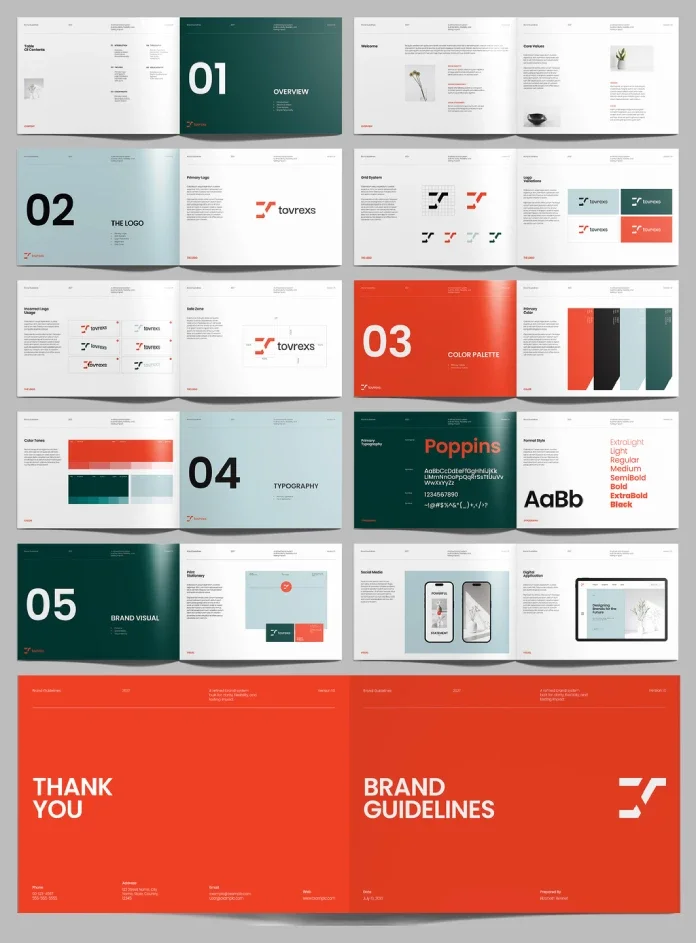
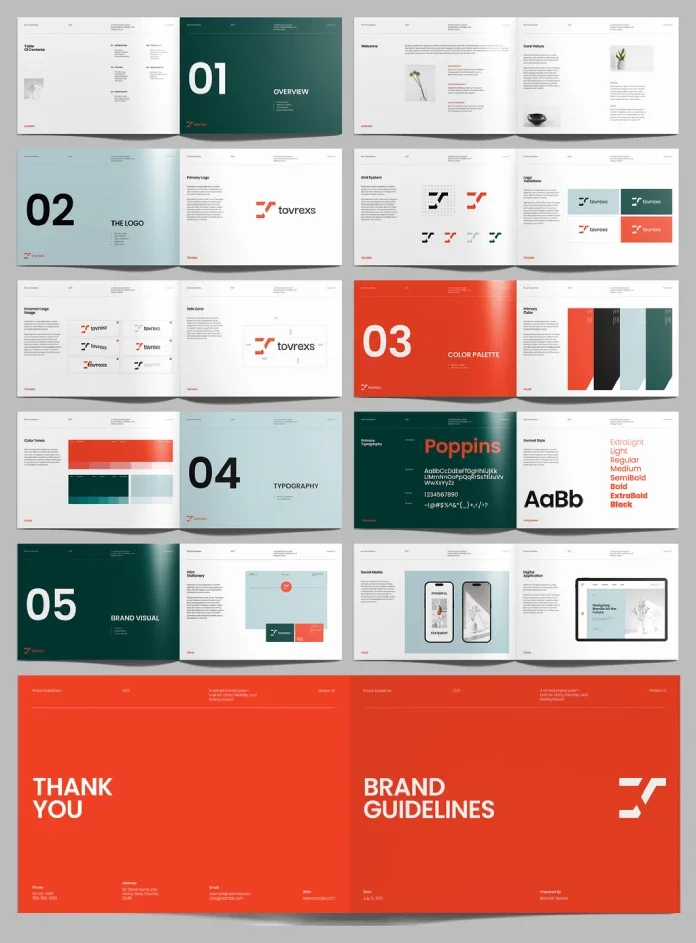
A brand manual has to do more than collect rules: it needs to help people find and apply them. Designcy Studio’s 22-page A4 template for Adobe InDesign tackles that job with an editorial structure built around oversized section numbers, generous color fields and concise specification pages. Its palette of orange, dark green, pale blue, black and white gives the document a strong visual rhythm while keeping each chapter easy to locate.
The structure is the template’s most useful design decision. Large chapter openers divide the document into Overview, The Logo, Color Palette, Typography and Brand Visual. Within those chapters, smaller pages shift from visual emphasis to practical detail. The result looks designed as a document, rather than a stack of specification cards. That distinction matters when a client or colleague needs to scan for a rule instead of reading the manual from cover to cover.
View the template on Adobe Stock. The supplied presentation template requires Adobe InDesign. Adobe’s product information is available here, with Creative Cloud details here.
A compact identity system, organized for scanning
The 22-page file aims for a focused visual identity guide, not an exhaustive manual for a large organization. It opens with a contents page and overview, then moves through Welcome and Core Values before reaching the logo rules. The later Brand Visual chapter shows the identity in use across print, social content and a digital interface. That progression gives the reader a path from the brand’s intent to its practical applications.
| Specification | What’s supplied | Design implication |
|---|---|---|
| Creator | Designcy Studio | The template is distributed through Adobe Stock. |
| Software | Adobe InDesign | Layouts can be adapted in an editorial design workflow. |
| Page size | A4 | Suitable for a print-oriented manual and a digital PDF. |
| Length | 22 predesigned pages | Room for core identity rules and selected applications. |
| Color mode | CMYK | Set up for print production, subject to proofing. |
| Customization | Editable layout, colors, type, images, logos and copy | Adapt the framework to an approved identity. |
| Photography | Preview images only | Supply your own images or use properly licensed material. |
The five section openers do more than add variety. They create a navigation system through color and scale: dark green marks Overview, Typography and Brand Visual; pale blue introduces logo and typography transitions; orange gives the Color Palette chapter the loudest entrance. The oversized numerals reinforce the sequence, so the reader can register a section change quickly even when moving through the PDF in a hurry.
That hierarchy also sets a useful limit on decoration. The full-page colors carry the chapter transitions; the specification pages can then use a quieter layout for details. For teams presenting identity rules to people who may only consult a few pages, this makes the manual easier to browse without flattening every spread into the same format.
Logo rules move from construction to common mistakes
The logo chapter follows a practical sequence: Primary Logo, Grid System, Logo Variations, Incorrect Logo Usage and Safe Zone. It begins with the mark, then shows how it is constructed and how it changes across backgrounds. From there, it makes room for misuse examples and spacing guidance. This order reflects the questions that arise when an identity passes from its designers to other people who need to use it.
The Grid System page puts the logo’s construction on the page as a visual explanation. The variations page can show how the mark behaves against light and dark fields, while the incorrect-use examples make the limits easier to understand. Safe-zone guidance completes the sequence by showing how much room the mark needs around it. Taken together, these pages connect the preferred treatment to the errors that can creep into everyday use.
That sequence is a strength because a rule is easier to apply when the manual demonstrates both the intended result and the problem it prevents. A logo may be technically correct yet still feel cramped, lose contrast or appear inconsistent when different people place it in different contexts. The template’s structure gives a brand designer a clear place to explain those distinctions. The actual measurements and examples, of course, need to come from the identity being documented.
Color carries the chapter structure
The palette pages introduce orange, deep green, pale blue and black, then show tonal variations. Across the manual, color serves two jobs: it identifies sections and establishes the visual character of the sample identity. The orange opener is especially prominent, while green appears across several chapters. Pale blue offers a lighter transition, and black and white keep the system grounded.
The tonal page is useful because a brand color rarely appears in isolation. A social graphic, a printed card and a digital screen can call for different balances of contrast and emphasis. Showing variations gives the identity more options than a single swatch alone, but the options still need rules. If every tone and accent appears at once, the distinction between primary and supporting colors can disappear. The template’s vivid orange may work best when reserved for moments that need emphasis.
Color values should be rebuilt from the approved specifications, rather than sampled from the preview image. The supplied CMYK setup supports a print workflow, but the file’s color mode cannot by itself guarantee the printed result. Stock, printer settings, profiles and proofing all affect how a large color field appears. Orange deserves an early print check because its visual weight is central to the sample layout.
Poppins is the type specimen, not the finished system
The typography section names Poppins as its primary typeface and displays weights from ExtraLight through Black. The large specimen turns the typeface into a graphic element, particularly against a dark green opener. A following Format Style page then shifts the focus from the family itself toward how type can be organized.
That distinction is important for anyone adapting the file. A typeface and a range of weights do not define a complete typographic system. The finished manual still needs the brand’s actual hierarchy: sizes, leading, paragraph spacing, caption treatment and rules for emphasis. It should also show how those decisions behave in the real copy, rather than relying on placeholder text that may have different lengths and line breaks.
Applications test the identity outside the manual
The Brand Visual section includes Print Stationery, Social Media and Digital Application pages. Together, these examples move from physical materials to compact social content and an on-screen interface. That spread of contexts gives the manual a chance to show whether the identity holds together beyond the logo and color pages.
Each application tests a different kind of constraint. Print stationery shows the identity on a physical object; social content asks the system to work at a smaller scale and compete with surrounding material; a digital interface introduces screen layouts and interface elements. These pages can make an abstract identity feel concrete for a client, but the examples need to match the brand’s real use cases. A polished mockup is a starting point for discussion, not a substitute for production specifications.
The photography shown in the preview is not included with the template. Replace it with images you own or have permission to use. Check that each image suits its intended crop and placement, then review the page again with the actual copy and graphics in place. Image proportions can change the balance of a spread, particularly when the layout relies on large fields of color and open space.
Customize the framework before polishing individual pages
The template saves time by supplying decisions that otherwise need to be made in a blank InDesign file: page dimensions, margins, grids, section openers, color hierarchy, image placement, page numbering and recurring layout elements. It is most useful when the identity already exists but its documentation needs to be assembled. A designer can replace the sample logo, update the swatches and typography, add real copy and images, then adjust the pages to suit the brand.
Begin with the file’s repeated structure. Check parent pages, paragraph and character styles, swatches, margins and recurring page elements before editing every spread independently. Once the shared parts work with the new identity, test actual copy in the layouts. This helps reveal whether headings wrap, captions fit and specification pages have enough room. Only then should the smaller visual refinements begin.
- Insert the approved identity. Replace the sample logo and define the actual color and type rules before adjusting decorative details.
- Build color swatches from real values. Use the brand specifications instead of estimating from the preview, then assess key colors in a print proof if the manual will be produced on paper.
- Test the real copy. Add the brand story, values and usage instructions early. Actual text lengths expose layout problems that filler copy can hide.
- Replace all sample photography. Check image rights, crops and resolution for every page where the preview uses a photograph.
- Review an exported proof. Inspect small type, color fields, image quality and margins at the intended output size.
A4 gives the document a familiar page size for print and a straightforward proportion for a digital PDF. The vertical format leaves room for detailed rules without turning the manual into an oversized presentation. CMYK preparation also fits a print-first workflow, although the final PDF still needs a visual check at its intended size and output conditions.
Where the page count fits—and where it runs short
Twenty-two pages can accommodate a focused visual identity: logo construction and use, colors, typography, values and a few examples across media. That makes the template a sensible starting point for freelancers, small studios, agencies, early-stage teams and internal design groups documenting an established identity.
A larger or more complex system may need extra pages for accessibility guidance, motion, detailed digital components, voice and tone, data graphics, packaging or rules for identities used together. Those topics are not listed among the supplied sections. Add them when the brand’s work requires them, and preserve the template’s hierarchy as the document grows. The page count is a practical constraint, not a measure of whether an identity guide is complete.
The layout’s editorial character is its clearest design idea. Numbered openers make the chapter sequence visible, color fields help readers navigate, and quieter specification pages give individual rules room to land. The application spreads then show the identity beyond its own documentation. This approach works because each page type has a distinct job.
Its main risk is the familiar gap between a polished preview and a manual that has been tested with real content. The sample spacing, color balance and page rhythm may shift when a different logo, longer instructions or new imagery enters the file. Review the full document again after replacing the placeholders, rather than assuming the preview’s balance will carry over unchanged.
For a team that needs an A4 identity manual without building every page from scratch, Designcy Studio’s InDesign template offers a clear framework and a useful spread of brand applications. Its strongest lesson is practical: make the rules easy to find, then show how they behave in the places where people will use them.
View the template on Adobe Stock.
Frequently asked questions
Who created the template?
Designcy Studio created the template, which is distributed through Adobe Stock.
What software does it use?
The supplied layout is for Adobe InDesign and can be customized there.
How many pages are included?
The template contains 22 predesigned A4 pages.
Can it be printed?
The supplied file uses CMYK and is set up for a print workflow. Review a proof for color, type, image quality and margins before production.
Are the preview photographs included?
No. Replace them with your own images or properly licensed photography.
Can the colors and type be changed?
Yes. The file is customizable, including its colors, typography, imagery, logo, text and page layouts.
Is 22 pages enough for a brand manual?
It can cover a focused visual identity and selected applications. A broader system may need more sections, depending on its uses and rules.
Can the finished file be shared as a PDF?
Yes. The A4 layout can be used for a digital manual as well as printed documentation.
| Rev | Description | Date |
|---|---|---|
| A | Issued for reading | |
| B | Viewed 888 times | Current |