RedGiant’s 12-Page InDesign Pitch Deck Uses Record-Sleeve Graphics and a Restrained Palette
- Project
- Graphic Design
- Drawn by
- Dirk Petzold
- Issued
- Sheet
- A-28
RedGiant’s 16:9 InDesign deck pairs a record-inspired layout with cream, black and orange. Its 12 editable pages need your own images.
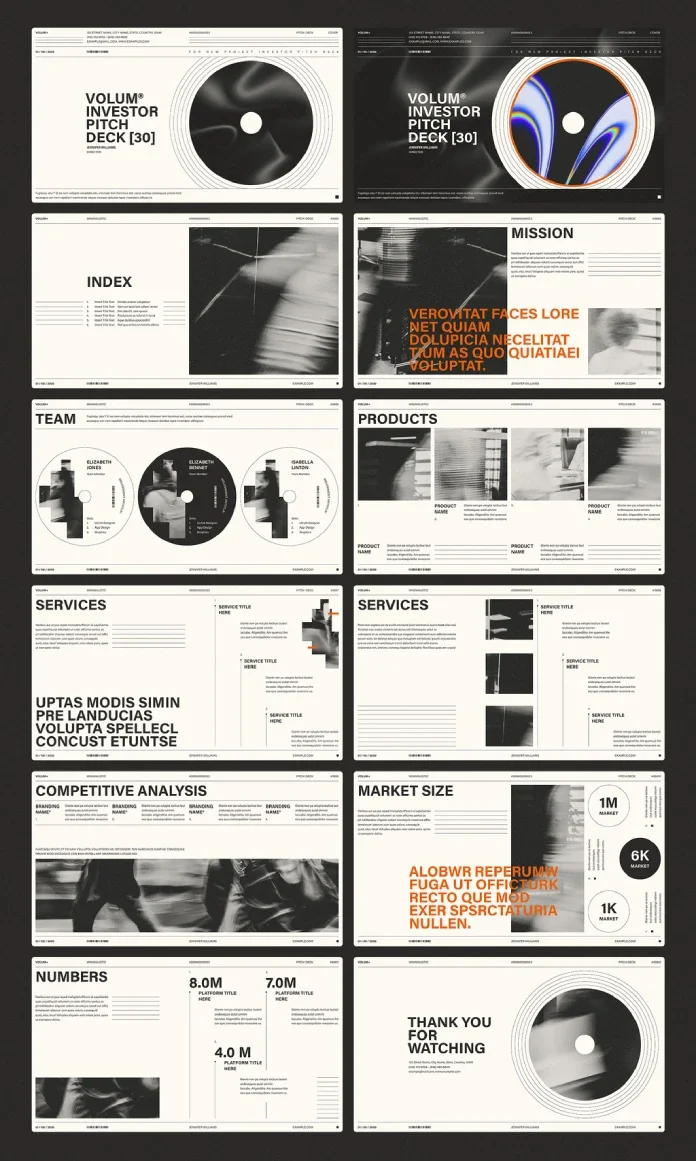
A record-inspired disc gives RedGiant’s InDesign pitch deck a visual anchor, while a cream, black and orange palette keeps the slides quiet. The contrast makes the template’s main design choice clear: recognizable graphics can give a presentation character without competing with its claims. Adobe Stock contributor RedGiant created the 12-page file for founders, freelancers, small studios and designers preparing client proposals.
The template is built in Adobe InDesign and measures 1920 × 1080 pixels, in a 16:9 format suited to screen presentations. Its pages and design elements are editable, but the photos shown in the preview aren’t included. You’ll need InDesign installed to open and customize the file; Adobe offers the latest version for Mac and PC through its InDesign product page and Creative Cloud website. View the template on Adobe Stock.
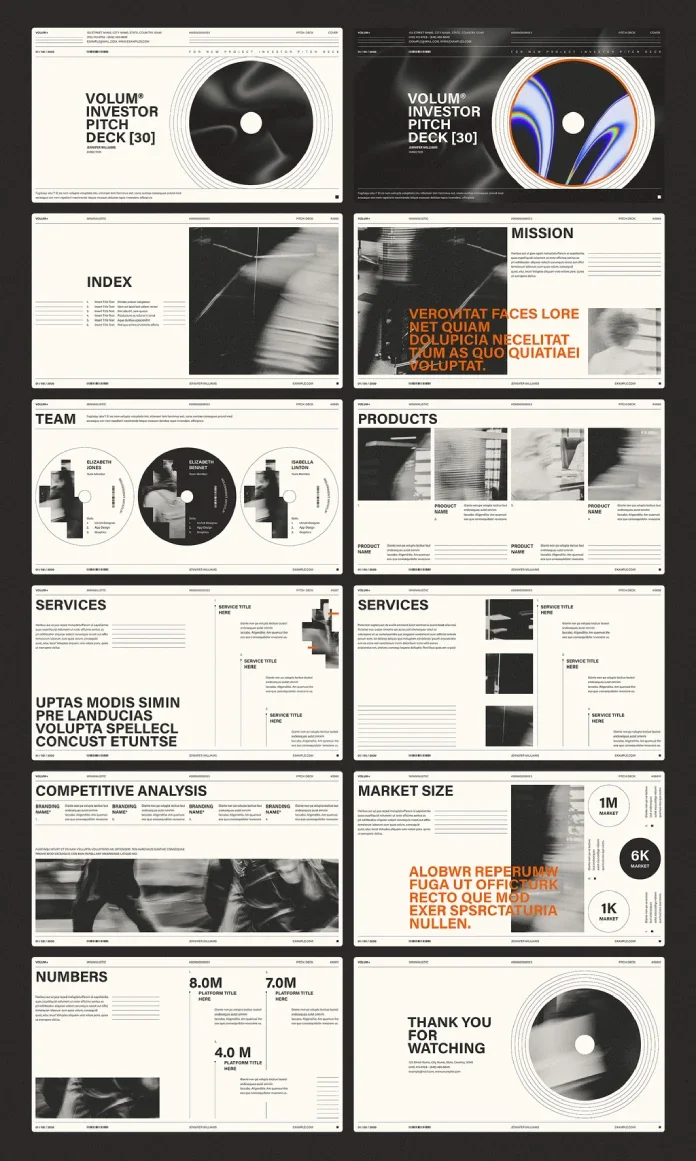
A record sleeve sets the visual system
The cover and final page feature a large vinyl-style disc framed by thin concentric rings. It’s a more distinctive starting point than a reserved logo space, and the motif gives the presentation a sense of cohesion from its opening slide to its sign-off.
A narrow strip at the top of each page holds a brand mark, page label, document number and small barcode. The footer repeats a date, name and web address. Together, these details frame the slides like stationery, giving the deck a consistent structure for information and identity.
Cream and black form the base palette. Orange appears on selected headlines, drawing attention to key statements without spreading emphasis across the whole page. Two cover treatments offer different levels of energy: the light version feels quieter, while the dark version adds an orange swirl with rainbow edges inside the disc. That makes the choice less about changing the deck’s structure and more about setting its opening tone.
What’s inside the 12 pages
The page sequence moves from an opening statement into supporting material, then returns to the disc motif for the closing page. It includes a cover with a title block and director name; an index beside a blurred monochrome photo; and a mission page built around a large orange statement over a grainy image.
The team page places three portraits inside circular, record-like frames. That treatment makes different headshots feel more consistent by giving them the same crop. Product information uses four image columns with captions. Two service layouts present numbered titles with short copy, while the competitive analysis page lines up four brand columns above a wide image.
The market-size page uses three circles labeled 1M, 6K and 1K. A numbers page presents three large figures, including 8.0M and 7.0M. The closing “Thank You” page brings back the disc and adds contact details. The mix can support startup presentations as well as agency and client proposals, though the text and figures need to be replaced with information relevant to the presenter.
Keep the copy as considered as the layout
The sparse palette and large headlines leave little room for long claims. In particular, a lengthy mission statement can crowd the image beneath it. Draft the key message in a compact sentence, then check the layout with the real copy in place; placeholder text may not reveal where a headline wraps or feels cramped.
The service pages are the densest layouts, since their numbered titles and descriptions ask the viewer to follow several pieces of information. Numbering helps preserve the reading order, but each item still benefits from concise wording. Across the deck, the main practical test is whether the visual frame supports the content once the sample copy and imagery are gone.
Customization takes place in InDesign: edit text frames, replace images in their frames and update the orange swatch to change the accent throughout the file. The template’s grid provides a shared alignment structure when blocks move. The source doesn’t name a price or provide a release date, so check the Adobe Stock listing for current availability.
Present it on screen or share it as a file
The 1920 × 1080 format fills a 16:9 screen, making it suitable for laptops, projectors and many conference displays. InDesign can export a standard PDF for full-screen presenting or follow-up by email. An interactive PDF can include buttons and page transitions; the index entries can also link to their corresponding pages. For online sharing, InDesign can publish a web version and provide a shareable link.
InDesign also supports animations, including presets, timing and motion paths. These can play in online publishing and fixed-layout EPUB output, but they won’t play in a static PDF. Individual pages can be exported as JPEG or PNG images for carousel posts. Their oversized headings should remain readable at small sizes, though the page designs will work best when each image carries one clear idea.
What to consider before using the file
The main production constraint is the missing photography. The preview’s blurred and grainy images contribute to the look, so bright, sharply lit replacements may shift the mood. Choose images with the intended treatment in mind, and review them beside the cream, black and orange palette before finalizing the slides.
The other constraint is software: the template requires Adobe InDesign. Teams working in PowerPoint or Keynote can’t edit the file in those applications. Compared with broader presentation templates, this one offers a shorter 12-page set, a quieter visual style and more control over layout in InDesign. Its fit depends on whether that software and image-editing workflow suit the project.
For a deck that needs to move from screen presentation to PDF or online sharing, the 16:9 format and editable grid give the content a useful starting point. The strongest results will come from keeping the message concise, supplying photography that matches the reference treatment and letting orange mark only the claims that need to lead.
View RedGiant’s template on Adobe Stock. Browse more options in WE AND THE COLOR’s Templates category.
The original post, This Sample Pitch Deck Presentation Template for InDesign Looks Stylish Yet Clean, appeared on WE AND THE COLOR.
| Rev | Description | Date |
|---|---|---|
| A | Issued for reading | |
| B | Viewed 490 times | Current |