E-Type’s 16-Page InDesign Welcome Kit Gives Client Onboarding a Clear Structure
- Project
- UX & UI Design
- Drawn by
- Dirk Petzold
- Issued
- Sheet
- A-213
E-Type’s vertical InDesign deck pairs bold editorial type with editable color swatches and image frames, with a few layouts to adapt for smaller teams.
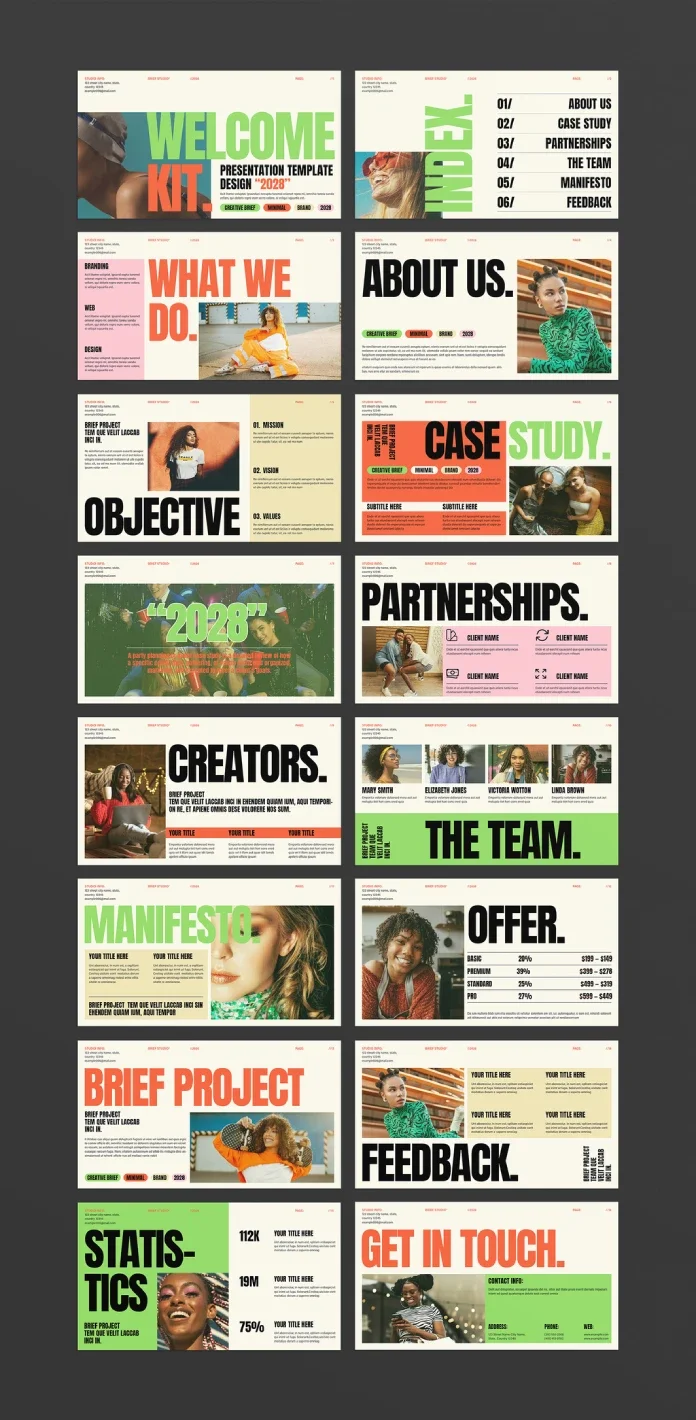
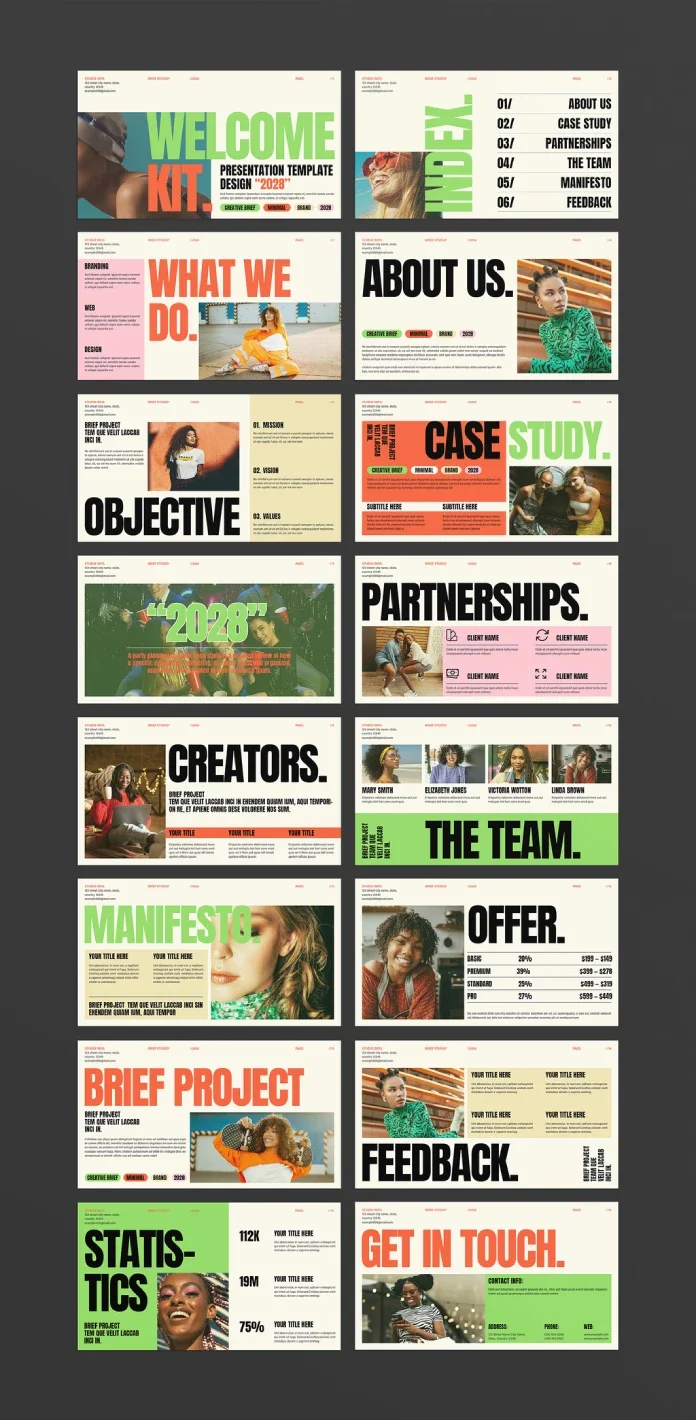
A client welcome deck has a specific job: set expectations, introduce the people doing the work and show what comes next. E-Type’s 16-page Welcome Kit Presentation Template gives that job a defined sequence, from studio introduction to project brief and feedback. Its vertical format and strong headline typography make it feel closer to a designed publication than a conventional business deck.
The template is an Adobe InDesign file measuring 1080 × 1920 pixels, built for screen presentations. E-Type is credited as the designer and Adobe Stock contributor; the source gives no launch date. The review material describes the file as shipped, with its page order and technical details checked against the preview and Adobe Stock listing.
A sequence built around onboarding
The distinction between a welcome kit and a pitch deck is useful when judging the layouts. A pitch deck argues for a project; a welcome kit helps a new client understand the work they’ve already agreed to begin. E-Type’s sequence starts with a cover and an index, then moves through the studio’s work, team, values, offer and working process.
The index names six sections: About Us, Case Study, Partnerships, The Team, Manifesto and Feedback. The complete 16-page sequence is:
- Cover, titled “Welcome Kit”
- Index
- What We Do
- About Us
- Objective, covering mission, vision and values
- Case Study
- A full-bleed client testimonial
- Partnerships, shown as a four-client grid
- Creators, introducing the team
- The Team, arranged as a four-person photo grid
- Manifesto
- Offer, with a four-row pricing table
- Brief Project
- Feedback
- Statistics, presented in three metric blocks
- Get In Touch, with contact details
The order gives the deck a clear opening stretch: introduce the studio, explain its work and values, then show a case study on page six. That early example gives clients a concrete reference point before the deck moves into team details and project logistics. The remaining pages carry the conversation into pricing, briefing and feedback.
Type and color do much of the work
Bold, condensed uppercase headlines give the pages a consistent editorial character. They sit against a warm off-white ground, with pink, coral and mint color blocks providing contrast. The result has a strong visual identity before the client’s own copy and images go in. The source says free fonts are linked in the included help file, giving designers a straightforward starting point for matching the template’s typography.
The color system uses InDesign swatches rather than isolated fills. Updating a swatch changes its use across the document, so a studio can adapt the palette centrally instead of hunting through individual shapes and frames. That makes the template easier to recolor as a system, especially when a client’s brand uses a different set of tones.
Photo placeholders sit on a separate layer from the text and background elements. In InDesign, the Content Grabber can replace an image within its frame while retaining the existing crop and placement. The preview photographs are not included in the download, so buyers should plan to supply their own imagery.
Screen presentation, with animation left to you
The 1080 × 1920 vertical canvas is intended for screens. It matches the proportions of Instagram Stories and can also be exported as individual images for a LinkedIn carousel. For a projector presentation in landscape orientation, E-Type sells a separate landscape version of the system.
The file doesn’t come with motion effects already applied. Designers can add them through InDesign’s Animation panel at Window > Interactive > Animation. Select a text or image frame, choose a motion preset such as Fade In or Appear, then set delays on individual objects to control when they enter. Sequential headline words and gradual image fades are possible, but each effect needs to be set up manually. Anyone new to the panel should allow extra time to learn the controls; the template’s help material doesn’t provide an animation walkthrough.
Layouts to adapt before sending
The Offer page is designed for a four-tier pricing structure. Studios with a single retainer may find that three rows have no purpose, while stretching one offer across the table could leave the layout feeling sparse. The Team and Creators pages make a similar assumption about scale: both expect a group, and the photo grid is built for four people. A solo designer may need to rebuild those pages instead of simply removing an unused frame.
The deck is best suited to small studios and creative directors introducing clients to ongoing work. Its mix of narrative pages, practical details and three metric blocks keeps the presentation from becoming a pricing sheet, while the defined sequence helps teams give onboarding a repeatable shape. The source characterizes the balance as roughly 70 percent narrative and 30 percent data. That’s a useful read of this particular deck, rather than a measured industry standard.
File details and availability
The template is available from Adobe Stock as an editable 16-page InDesign file in .indd and .idml formats. It requires Adobe InDesign. Adobe Stock licensing can involve either a subscription credit or a single-template purchase; check the listing for current pricing and terms. The source does not specify a price.
Some versions of E-Type’s welcome kit templates may also include a Canva file, but the source advises checking the specific listing. For basic text and image changes, InDesign experience is helpful but not essential; animation and more substantial layout changes require greater familiarity with the software.
| Rev | Description | Date |
|---|---|---|
| A | Issued for reading | |
| B | Viewed 576 times | Current |