Guuver’s Retro Halloween Flyer Lets an Arched Cat Lead the Design
- Project
- Graphic Design
- Drawn by
- Dirk Petzold
- Issued
- Sheet
- A-201
Guuver’s A4 vector flyer pairs a bold black cat with burnt orange, cream and charcoal. Here’s how its typography and editable layout work in print.
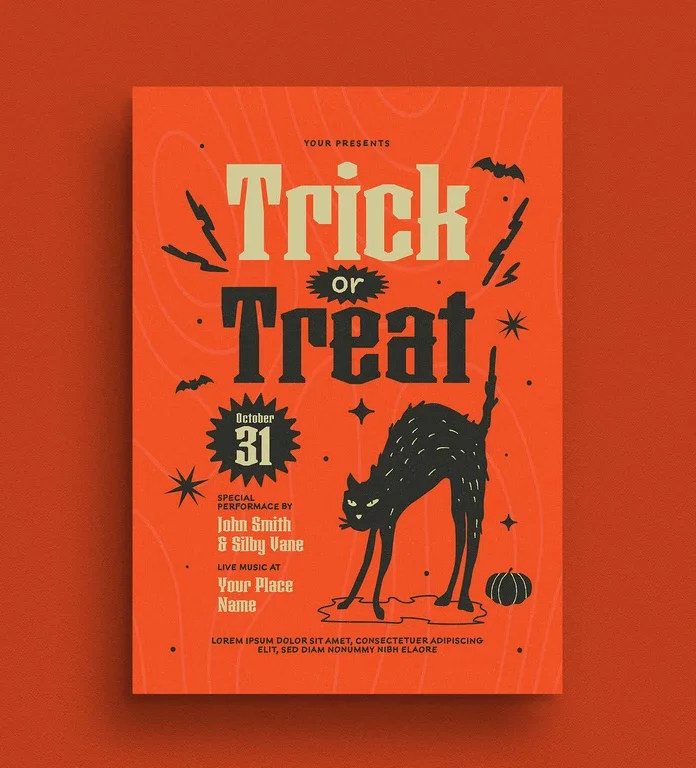
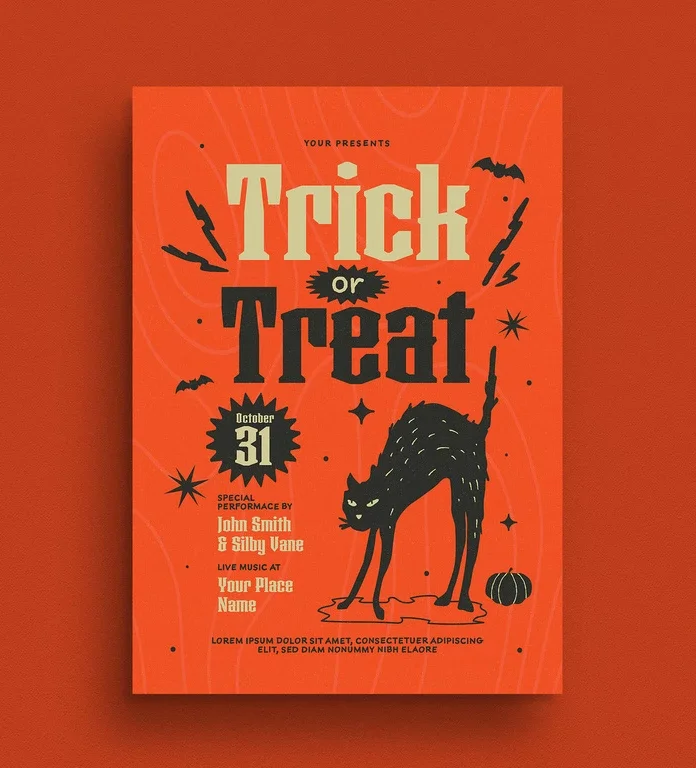
One arched black cat gives Guuver’s Halloween flyer its character and its visual hierarchy. The Adobe Stock contributor’s A4 design keeps the rest of the composition focused: burnt orange fills the page, charcoal and cream carry the type and illustrations, and small decorative marks keep the open spaces lively. I edited the Illustrator vector and found a layout that scales cleanly, with a couple of print details worth adjusting before it goes out.
The template is listed on Adobe Stock. It’s built for editing in Adobe Illustrator, and the document uses CMYK color for print.
A limited palette gives the poster its punch
The design recalls mid-century print through flat color, chunky display type and uncomplicated spot illustration. Its colors behave like a small set of printing inks: charcoal and cream sit against burnt orange, while lighter orange contour lines add texture. That restraint ties the headline, date badge and cat together, so the main elements stay legible at a glance.
The headline splits “Trick” and “Treat” across two lines, with cream for one word and charcoal for the other. A spiky black starburst holds the small word “or,” giving it a clear place instead of letting it vanish between the larger lettering. The typeface is heavy and slab-leaning, with cut corners that suit the flyer’s hand-printed feel.
There is a practical trade-off in the color pairing. The cream lettering has less contrast against orange than the charcoal line, and the top word looked soft on an inexpensive office printer. Darkening the cream by about ten percent is a useful adjustment to try before printing. Check the result on the printer and paper you plan to use.
The cat carries the mood
The cat is more than a decorative mascot: it has raised fur, narrowed eyes and an upright tail that point the viewer back toward the headline. A loose puddle shape under its feet anchors the figure against the background. Without that base, the cat could appear to float.
Small details fill out the composition without challenging the central illustration. Lightning bolts frame the headline; bats sit in two corners; four-point sparkles and dots occupy gaps. A single tiny pumpkin near the cat’s back leg is a wry nod to familiar Halloween imagery. The faint contour lines behind the type add depth while staying within the orange family.
Editing the vector and preparing it for print
The artwork is a true vector, so its shapes remain crisp when enlarged. In my Illustrator edit, the cat scaled to poster size without pixel edges. The grain texture behaves differently from the drawn shapes, though, and may make the file slower to preview or handle. Simplifying that texture can help before sending the artwork to a copy shop.
- Open the file and inspect the Layers panel so you can identify the text and artwork before editing.
- Unlock the text layers and replace each placeholder, including the top line, performer names, venue and footer.
- Check the fonts. Install any missing typefaces or convert the text to outlines if you need to preserve its appearance on another system.
- Review the information hierarchy, then export a PDF with bleed for print.
The page is A4, measuring 210 × 297 mm, and the document is set to CMYK. For a US Letter print, check the margins and adjust the artboard; the page proportions differ, so trim or reposition the background contour lines rather than cutting into the cat. For social media, convert a copy to RGB and check the orange on screen, where it may shift slightly.
Where the layout has limits
The lower-left information block is compact. Two performer names and a venue already share the space, so a longer lineup may require moving or shrinking other elements, including the cat or date badge. The composition is designed to sell the mood of one event, not carry a multi-stage schedule. Teams with a detailed program will need a different structure.
Placeholder text also needs careful attention. The preview includes “Your Presents” at the top and lorem ipsum in the footer; replace both, along with all event details, before export. It’s an easy step to overlook when the illustrations and headline draw the eye first.
Best fit for a compact event announcement
The flyer’s proportions and personality suit a school fundraiser, bar night, neighborhood gathering or small music venue. Its editable vector format also gives a designer a fast starting point for custom event details and color adjustments. For a more formal corporate gathering, the expressive cat and playful type may set the wrong tone.
For print, test the cream headline, check the page margins and simplify the grain if the file becomes cumbersome. The design’s strength is its clear focal point: keep the information concise enough to let the cat, headline and date do their work.
| Rev | Description | Date |
|---|---|---|
| A | Issued for reading | |
| B | Viewed 513 times | Current |