RedGiant’s Vertical Business Card Template Gives the Back a Clear Design Role
- Project
- Graphic Design
- Drawn by
- Dirk Petzold
- Issued
- Sheet
- A-212
RedGiant’s InDesign template pairs monochrome flower imagery with a structured contact side, two layout options and practical print setup.
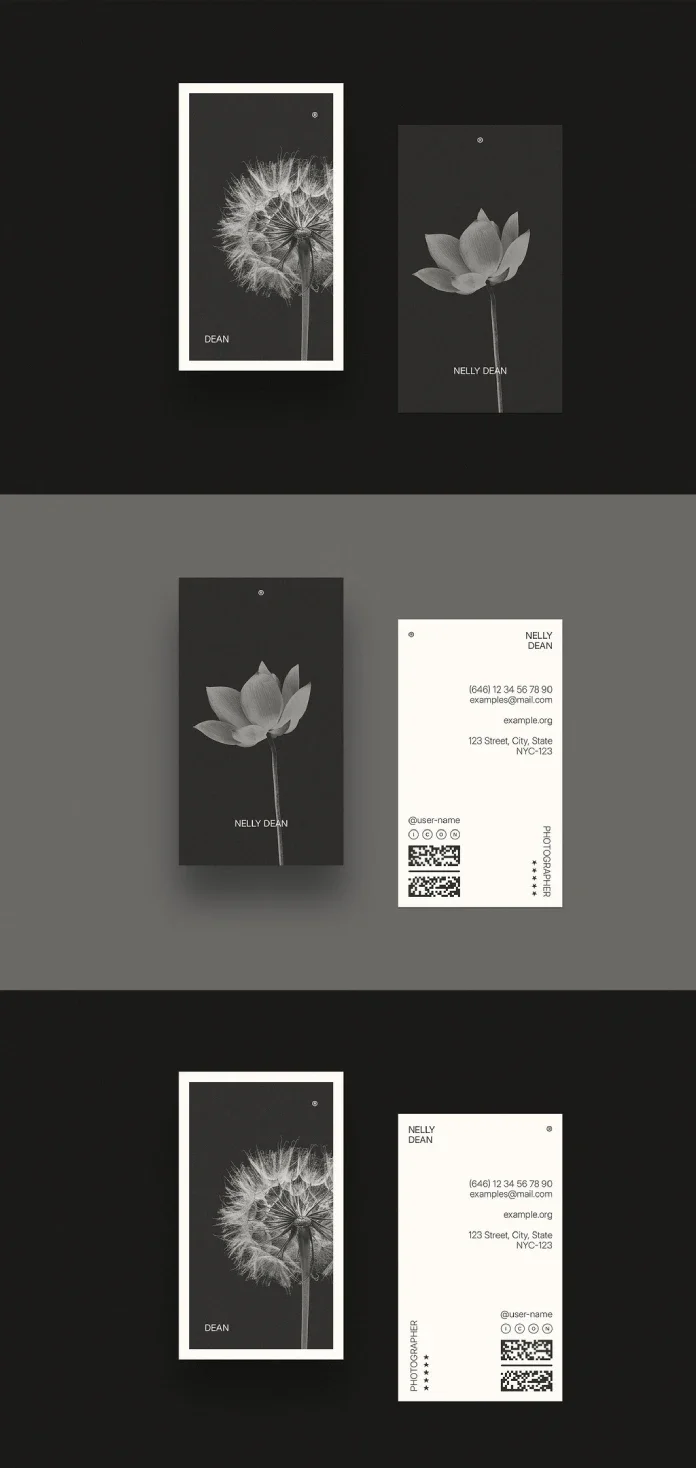
The strongest idea in RedGiant’s vertical business card template is on the side many designs leave as an afterthought. Its reverse has a clear reading order, using the card’s height to separate a name, profession, contact details and QR codes into distinct zones. The result feels considered from both sides, while leaving enough room to adapt the photography and copy for a different creative practice.
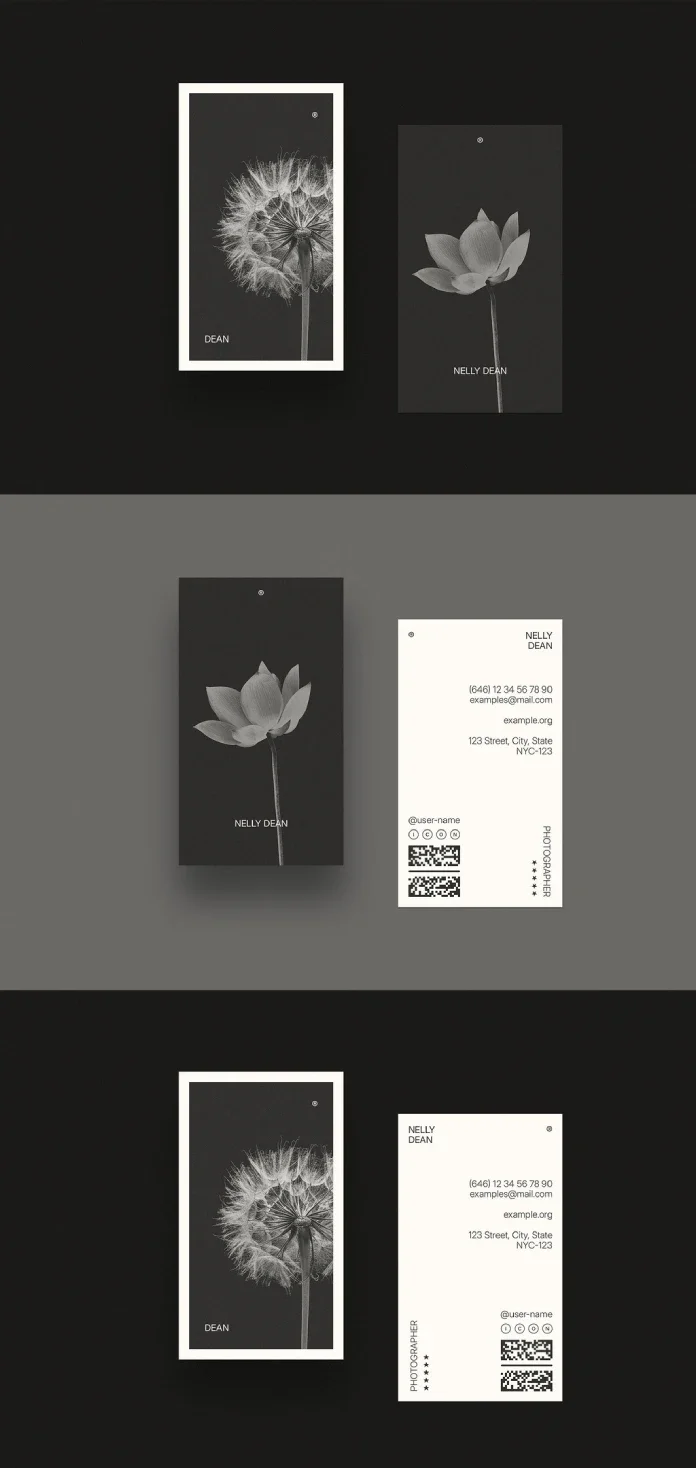
Available through Adobe Stock as an InDesign document, the template is built to a 2 × 3.5 inch vertical format and set up in CMYK for print. It includes two variations, one featuring a close-up black-and-white dandelion and the other a lotus, both set against a dark background. The flower images establish the mood, but the layout is what makes the file useful: the reverse functions as its own composition rather than a space to fill with leftover details.
View the template on Adobe Stock.
Two fronts, one restrained system
The dandelion option places the photograph inside a thin cream mat, creating the impression of a small framed print. The lotus version has no such border; its image reaches closer to the card’s edges, giving that option a softer, less formal feel. On both fronts, the name is the main piece of text, accompanied by a small registered mark in a corner. That restraint lets the photograph carry the visual character without turning the card into a miniature portfolio page.
The photographs are replaceable. They sit within defined image areas, with space around the type, so the layout can accommodate a portrait, product photograph or texture. That separation is useful when a brand’s imagery changes: the name doesn’t have to compete with a busy picture, and the basic composition isn’t tied to one particular flower. Brighter or higher-contrast images may still call for a crop or tone adjustment, but the contained frame gives them room to work.
There is also a practical distinction between the downloadable file and the listing preview. The staged photograph of a card on a table is a presentation mockup; the supplied item is the InDesign document. Buyers planning to edit the design should expect a source file, not a finished scene or mockup file.
The reverse turns information into a composition
On the back, the name and title occupy the upper area, contact information sits through the middle, and two QR codes anchor the lower section alongside small social icons. A vertical “Photographer” label runs along the left edge, paired in the preview with star marks. Those details are sample styling rather than necessary content: a buyer can replace the profession and remove or adapt the stars to suit the work.
The vertical label is an economical way to identify a service without adding another box or divider. It gives the eye a starting point, while the name and contact details have their own positions in the grid. The small social icons interrupt what could otherwise become a dense list, and the QR codes make a distinct bottom zone for digital handoffs.
The two versions make a small but noticeable change to the information hierarchy. In one, the name sits at the top right against cream; in the other, it moves to the top left, with the registered mark nearby. Moving that anchor changes where a reader begins, even though the core information remains organized in the same way. Both versions are designed to be read quickly, which suits a card that may only be glanced at before it goes into a pocket.
The back also holds together if it’s seen by itself. That matters because people often look at the contact side after receiving a card, or set it on a desk where the front isn’t visible. Here, the profession label, name and grouped details give the reverse enough visual structure to stand alone.
Type and colour keep the system adaptable
The typography is an uppercase grotesque sans serif with generous letter spacing. It stays quiet in the hierarchy, supporting the names and contact details instead of competing with the flower images. That neutral treatment should also make it easier to adapt the file to different clients, though anyone changing the type should check that the spacing and small text remain legible at the final printed size.
Colour is similarly restrained: black, cream or off-white, and grayscale photography. This limited palette leaves room for a client’s existing identity and avoids asking the image and text to carry several competing colours. The CMYK setup also makes the file suitable for print workflows. A screen preview still can’t guarantee an exact printed match, so designers should check the exported file and follow their printer’s specifications.
Who the template suits
Photographers are an obvious fit for a layout built around image-led fronts. The structure could also work for independent architects, florists, tattoo artists and interior stylists—service providers whose work or craft can be introduced through a single strong image and a concise set of contact details. The restrained design may suit a boutique practice seeking a less conventional card, too.
The template has less room for businesses that need several phone numbers, multiple job titles or a large logo lockup. Adding more copy would compress the zones that make the reverse easy to scan. The vertical format is another consideration: it gives the QR codes a dedicated area and makes a distinctive portfolio image, but card holders and filing systems designed around horizontal cards may be less accommodating.
One sample name, Nelly Dean, matches the name of the housekeeper and narrator in Emily Brontë’s Wuthering Heights. The source of that choice isn’t given, so it’s best treated as a notable placeholder rather than an explanation of the design. Replace it, along with the sample profession and QR codes, before preparing the card for use.
Editing the InDesign file for print
The template requires Adobe InDesign. Adobe describes the current application through its InDesign product page, and its broader Creative Cloud page provides access to its software. The source file is an .indd document, so it won’t open as an editable layout in Illustrator, Photoshop or Canva without conversion.
Start by checking the paragraph and character styles. Editing those definitions helps keep type consistent across the two options, especially if both are being adapted. When replacing a flower photograph, use InDesign’s Content Grabber, the small ring that appears over a placed image. It lets you swap the image while keeping the frame and crop in place; check the crop afterward, since different subjects may need different positioning.
Next, replace both QR codes with codes that point to the intended destinations. The preview codes are sample content. Check that each new code scans from a printed test at the size used in the layout, and verify the destination before sending the file to print.
Finally, confirm the document’s bleed and trim settings against the printer’s specifications before export. Print vendors can ask for different bleed amounts, so the document’s CMYK setup doesn’t remove the need to check production requirements. The file’s listed dimensions are 2 × 3.5 inches in portrait orientation.
Quick specifications
| Detail | Specification |
|---|---|
| Contributor | RedGiant |
| Marketplace | Adobe Stock |
| File format | Adobe InDesign (.indd) |
| Dimensions | 2 × 3.5 inches, vertical |
| Colour mode | CMYK |
| Options | Two, with dandelion and lotus photography |
| Images | Black-and-white floral photographs, replaceable in the layout |
The template’s clearest lesson is structural: a reverse side can carry contact details without reading like a plain list. Its vertical grid gives the information and QR codes distinct places, while the image frame keeps the front adaptable. Before committing to the design, check that the vertical orientation suits how the card will be handled, then replace the sample details and test the print setup.
View RedGiant’s template on Adobe Stock.
Explore more designs in WE AND THE COLOR’s Templates category.
| Rev | Description | Date |
|---|---|---|
| A | Issued for reading | |
| B | Viewed 644 times | Current |