RedGiant’s 20-Page InDesign Portfolio Template Builds Every Slide on One Grid
- Project
- Graphic Design
- Drawn by
- Dirk Petzold
- Issued
- Sheet
- A-17
RedGiant’s 1920×1080 InDesign template pairs a consistent grid with 20 portfolio and resume layouts, plus a few details to fix before presenting.
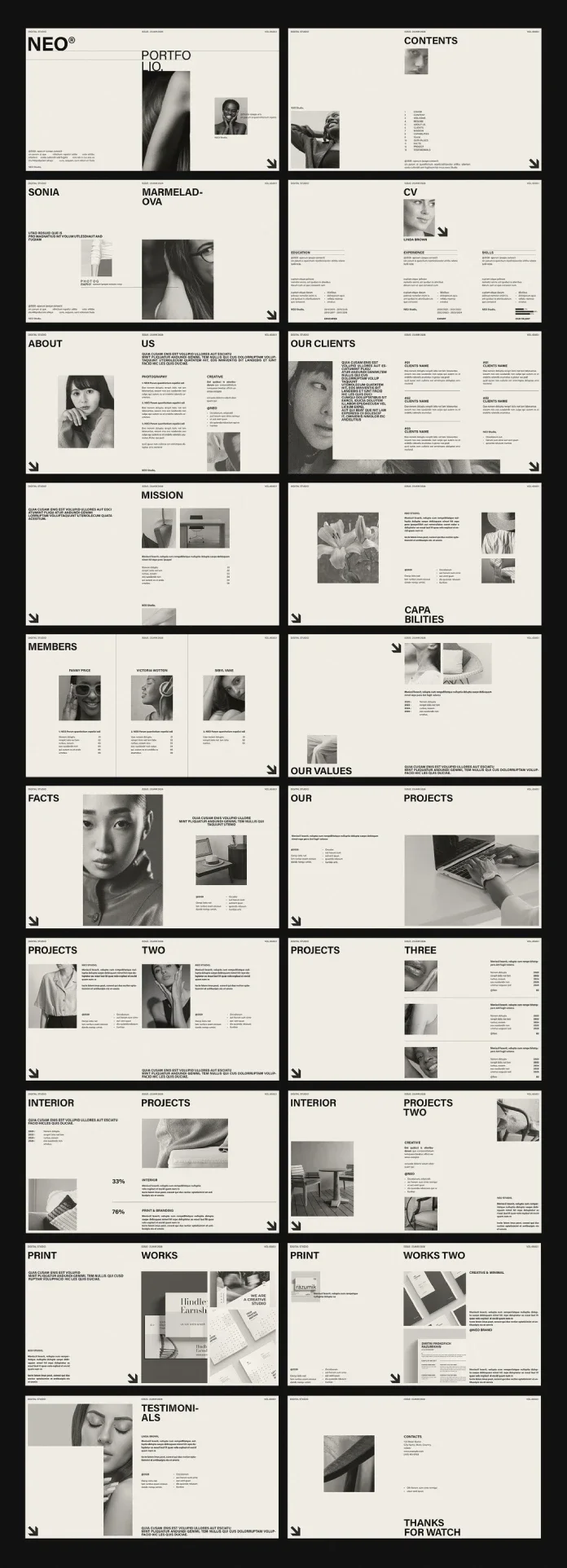
One grid does a lot of work in RedGiant’s 20-page InDesign portfolio template. At 1920×1080 pixels, its layouts fill a screen, giving designers a compact format for presenting work, experience and contact details. The recurring structure makes the pages feel like one publication, while leaving the imagery and copy to the person using the file.
RedGiant, an Adobe Stock contributor, designed the template for screen presentations and PDF decks. The download doesn’t include the preview photography, so the finished result depends on replacing those images and editing the supplied text. That’s a practical trade: the layout system is ready to adapt, but it still needs a careful pass before it represents a studio or individual.
View the template on Adobe Stock. Editing requires Adobe InDesign; the source points users to Adobe Creative Cloud for the latest version, without specifying a version or price.
A repeating structure across 20 pages
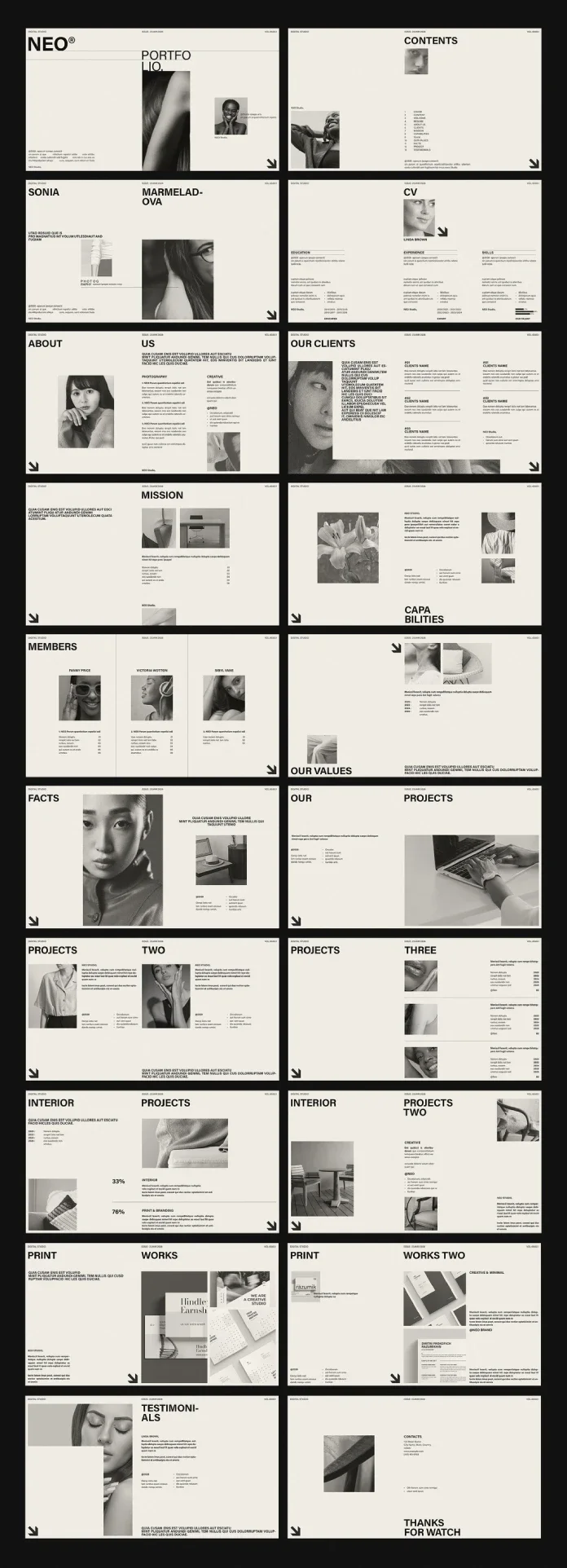
Headlines tend to align with the top edge, while a few sit in a bottom corner. Images follow column widths, and small text blocks tuck beneath them. Margins and alignment carry the visual identity, so each page can shift its content without feeling unrelated to the rest.
A narrow header line and a corner arrow recur throughout. The header holds a studio label and an issue stamp; replace the studio name with your own to make this repeating detail part of the deck’s identity. It also gives the pages a magazine-like rhythm. The grid serves a more practical purpose: it gives captions, images and headings predictable places, reducing layout decisions as the portfolio grows.
All 20 pages are editable. Users can add, duplicate or remove pages, and supply their own text, graphics and photography. The preview images are for display only and don’t come with the template.
From introduction to work samples
The opening four pages establish the frame: a cover pairing a heavy NEO® wordmark with a portrait, a contents page with 13 numbered entries, a page built around an oversized name, and a CV layout divided into three columns for education, experience and skills.
Pages five through eleven shift to studio information: About, Clients, Mission, Capabilities, Members, Values and Facts. On the Clients page, a white text panel overlaps a photograph to add depth without decorative effects. Members uses three columns separated by thin vertical rules. For an individual portfolio, the Members and Facts pages may need substantial editing or removal; they assume a studio context.
The next block contains three Projects pages, two Interior pages and two Print Works pages. The first Interior layout places the figures “33%” and “76%” above a fine rule, a useful pattern to adapt for case-study results when those figures are relevant to the work. The Print Works pages use stationery and business card mockups.
The final two pages provide a testimonial layout with a portrait and quote block, then a contact page with a large sign-off. Both maintain the deck’s margins and recurring header detail, giving the close the same visual footing as the opening.
Fix the copy and type before presenting
The preview shows headline breaks that split words across lines: “Portfolio” becomes “Portfo” and “lio,” while “Capabilities” breaks as “Capa” and “bilities.” “Testimonials” is also cut short in the preview. New wording will change the line lengths, but every heading still needs a manual review after editing. This is one of the template’s main time costs: headings can shift when copy changes, even when the underlying layout stays in place.
Body text appears small beside the oversized headlines. It may read comfortably on a laptop, but the source warns that it can become difficult to see when projected in a meeting room. Increase the type size as needed, then check legibility from the back of the room. The final slide also reads “Thanks for watch.” Correct it to “Thanks for watching,” or replace it with a sign-off that suits the presentation.
The source describes this editing work as “Placeholder Debt”: the time required to turn supplied layouts and sample copy into an honest, finished presentation. Image-led pages may need little more than new pictures, while text-heavy layouts require closer attention to word lengths, line breaks and fit.
A focused workflow for a personal deck
- Open the InDesign file and use Find Font to check for missing typefaces.
- Replace the repeating studio label with your name or studio identity.
- Remove pages you don’t need, then revise the contents page to match.
- Place your own images and graphics; preview photography isn’t included.
- Rewrite headings before adjusting the rest of the copy, then inspect every line break.
- Export as Adobe PDF (Interactive) for screen viewing, or as JPEG for use in other slide tools.
For a short resume presentation, the suggested six-page selection is pages 1, 4, 12, 13, 19 and 20: cover, CV, two project pages, testimonial and contact. That sequence gives the work and experience room while keeping the deck brief.
The preview’s desaturated portraits and product photography sit against warm off-white pages. Images with a similar tonal range will preserve that quiet balance; saturated photography may compete with the restrained layouts. Converting images to grayscale is one option when colour distracts from the work.
Who the layouts suit
Photographers, small studios, freelance designers and students can use the file as a portfolio, resume presentation or pitch deck. Its shared grid gives users a clear placement system, though it still takes basic InDesign editing to replace the content and prepare the document.
The restrained visual direction may be a poor fit for work that depends on vivid colour. In that case, the images and the layout may pull in different directions. The template’s most useful feature is its consistency, so choose imagery and copy that can work within its measured structure.
For a closer look at availability, visit the Adobe Stock listing. The source doesn’t give a launch date, price or specific InDesign version. Before sharing the deck, replace the sample content, check the typography at presentation size and export a screen-ready PDF.
| Rev | Description | Date |
|---|---|---|
| A | Issued for reading | |
| B | Viewed 309 times | Current |